
How it works
Set up tonight. Take your first order tomorrow.
Here is everything that happens, from creating your shop to a customer ordering again, and which steps run by themselves.
Nothing to pay to start. You pay only when you sell.
- Nothing to pay to start
- Set up from your phone
- No app for customers

Getting started
Your first evening.
-
You
Create your shop
Your name, your shop link and your colours.
-
You
Add products
Photos, prices, sizes; each gets a short code.
-
You
Connect
Payments, and Instagram or WhatsApp if your plan includes them.
-
You
Share
Put the shop link in your bio and post with codes.
What your customers see
Your shop, on their phone.
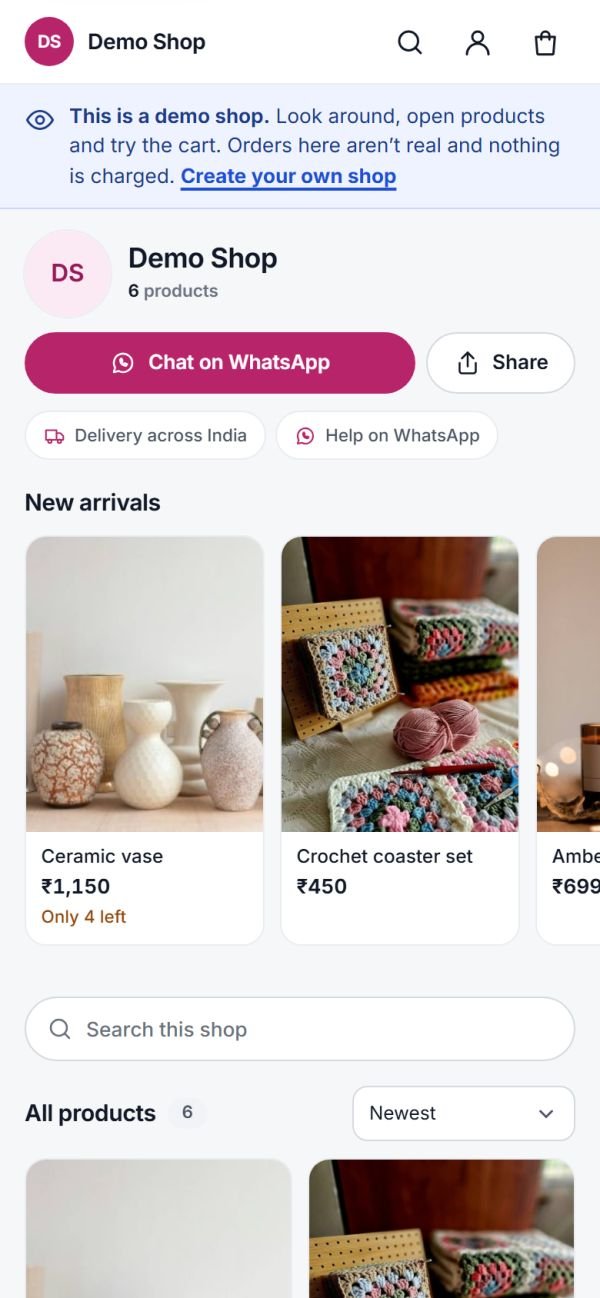
This is the demo shop: real shop pages, product pages, cart and checkout. Open it and look around; it never takes an order.
- Your name and photos. Logo, banner, colours and your products.
- Cart and checkout. UPI, card or cash on delivery, with nothing to install.
- Order page and tracking. Customers follow their order without calling you.
Every order after that
Who does what.
Steps marked “automatically” need nothing from you.
- Customer
- Your shop, automatically
- You
-
Customer
Comments or DMs a code
On a post, a Live or in a chat.
-
Your shop, automatically
Gets the buy link
A private reply, sent by itself.
-
Customer
Pays
UPI, card or cash on delivery.
-
You
Pack and ship
Label, AWB, done.
-
Your shop, automatically
Updates on WhatsApp
Shipped, delivered, and a review request.
-
Your shop, automatically
Comes back
Back-in-stock alerts, coupons and new arrivals.
How to start
From sign-up to first sale.
Sign up
With your email; nothing to pay to start.
Make it yours
Logo, banner, colours and your shop details.
Add your first products
Start with what you post most.
Post with a code
Your first order lands in your list.
Questions
Questions before you start
Do I need a website?
No. You get your own shop page and links to share on Instagram and WhatsApp, and customers order from there.
Do my customers need to install an app?
No. They open your link, confirm with a code sent to their email or WhatsApp, and pay.
Can someone set it up for me?
Yes, setup help is available. You can also set everything up yourself from your phone.
Can I use it without Instagram?
Yes. Share your shop link anywhere: WhatsApp, Facebook, your bio or a QR code at your stall.
Your shop could be ready tonight.
Set up your shop this evening. Nothing to pay to start.